What is Enigma?
BlackSquare builds and sells patented, real time transparent hardware encryption and key management devices we call Enigma.
BlackSquare Enigma has the look and feel of a thumb drive, but it’s NOT a thumb drive!
Enigma delivers patented, real-time USB hardware encryption and decryption to satisfy the need for simple yet secure encryption.
Whether your data is stored on your hard drive, an external storage device or in the cloud, it’s more vulnerable than ever. Laptops and thumb drives can be lost or stolen. Networks and cloud storage apps can be penetrated and compromised. BlackSquare Enigma is a simple, safe and secure way to protect your data from these potentially damaging threats.
Data breaches and monitoring have become much more prevalent and sophisticated, frequent and costly. Whether your data is stored on your hard drive, backup drive, USB thumb drive or in the cloud, it’s more valuable than ever. BlackSquare Enigma is a simple, safe and secure way to protect your data from these daunting threats!
Find encrypted files using the ‘search’ function on both WIN and MAC
 Using BlackSquare Enigma, encrypted files and folders are easy to recognize. The small icon identifying the default program for each file changes to a black square with a “b²” in it and an additional file extension — .BKSQ (for BlackSquare) – will be added.
To find encrypted files, simply search the filename, or *.BKSQ!
BlackSquare Enigma is transparent to the Operating System
When you remove Enigma from your computer, all Enigma windows automatically disappear. All the recovery keys needed to decrypt your files reside within Enigma’s hardened security, not on your computer. No data is left behind for cyber thieves to use in their attempts to decrypt your files.
BlackSquare Enigma:
- No internet required; safer for the user!
- Doesn’t store data
- Connect any USB storage device to Enigma
- Right click or Drag n Drop to manage files and folders
- Create your own password
- Use any number letter upper or lower case, or symbol to create your own password
- Do NOT store password(s) in the computer or online
- Write your password(s) down on paper so no one has access other than you.
- Share encrypted files with others who have an Enigma
- Encrypts and decrypts in real time
- Encrypt files and folders and store anywhere (drives, One Drive, etc)
- Send encrypted files/folders anywhere; they will need to be decrypted in order to open them…great for travel and conference calls
- Describe encrypted files and how to decrypt
- Incredibly inexpensive at $50 per unit!!
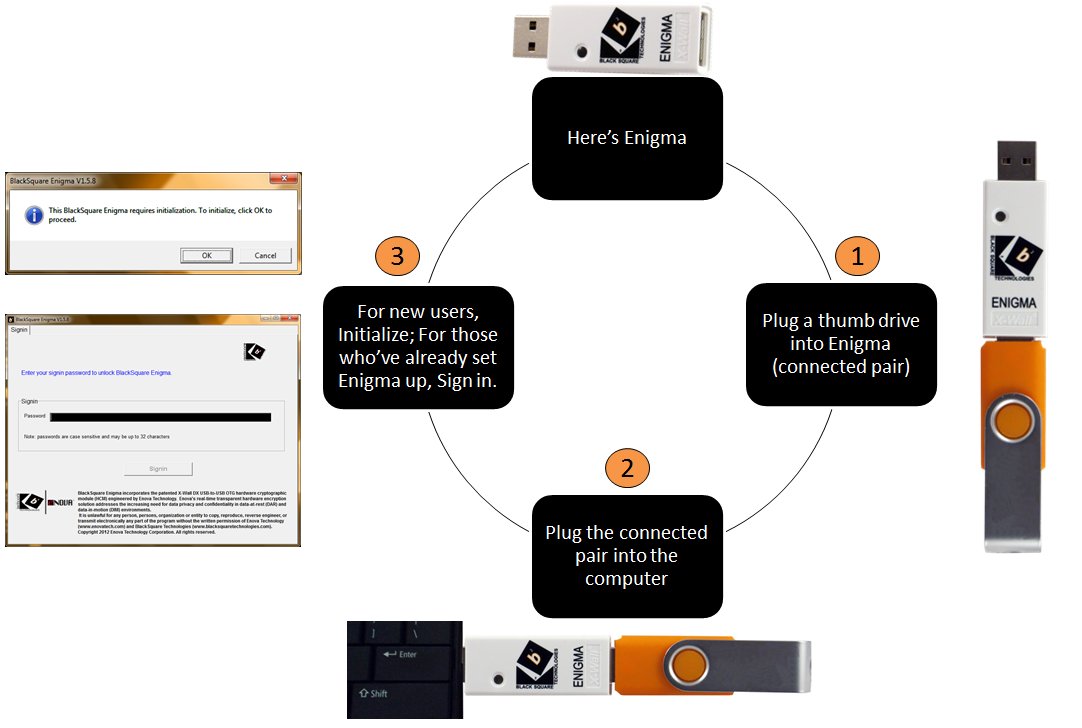
You will create a SIGNIN password that you’ll use each time Enigma is plugged into any computer. This password will ‘unlock’ Enigma. When you remove Enigma, all Enigma windows automatically disappear. Enigma is transparent to your Operating System.
There is a separate key recovery password — or passwords — for your files, giving you true two-factor authentication. Anyone trying to get to your encrypted files would need three things: the Enigma device, your SIGNIN password and your key recovery password(s) to gain access to your encrypted files. Each password may be up to 32 characters in length, and can use any standard ASCII character, including the spacebar.
Drag ‘n Drop, or Right Click – your choice!
We have provided a complete menu of features: Encrypt, Decrypt, Open decrypted files, Send to secure FTP site, Refresh and Delete files by right clicking on them and selecting the option from the pull-down menu. Or, simply drag files and drop them to the appropriate Icon.
Depending on the size of the file or folder, encrypting or decrypting an entire folder generally takes just a few seconds. Encrypting a single file is virtually instantaneous.
You can selectively encrypt/decrypt one file, multiple files or an entire folder at once. For additional security, you can use and manage different recovery keys (passwords) to manage files or folders. You can encrypt the files within their original folder or encrypt and move them into a new folder.
 Encrypted files are easy to recognize. In your folders, the small icon identifying the default program for each file changes to a black square with a “b²” in it and an additional file extension — .BKSQ (for BlackSquare) – will be added to the end of the file extension.
If you have encrypted a folder on your desktop, for example, the folder icon will be the black square with the b2 inside, making it very simple to identify encrypted data.
Once you remove Enigma from your computer, all Enigma windows automatically disappear. Your files are still encrypted, of course. Your private password reside within Enigma’s hardened security (where no one can uncover it), not on your computer.
You can encrypt files you share with others, for example, on a network or in the cloud. But the people you’re sharing them with will need an Enigma of their own and will need to know the password used to encrypt the files. If they have an Enigma and know the password, they can decrypt and read/modify the file(s) you’ve shared with them.
And when you plug Enigma back into your computer, you’re starting fresh.
All you will need to do is type in your SIGNIN password (the one that you’ve created), and you’re up and running.